
Why do website redesigns lose rankings?
A redesign loses rankings when the things Google used to rank the old site disappear or move without a trail. The usual causes:
- Changed URLs without redirects. Old URLs return "not found" errors, so visitors, links from other sites, and Google can't follow them to the new pages.
- Removed or thinned content. Pages that ranked for specific searches are cut or merged into shorter pages.
- Changed structure. Google has to work out the new site's pages from scratch. Google says that if you combine a site move "with a redesign of the site's content and URL structure in the new location, you will probably see some traffic loss as Google might need to relearn and reassess the individual pages."
- Launch mistakes. A
noindextag or robots.txt block left over from the staging site keeps the new pages out of search.
None of these come from the new design itself. They come from what changes underneath it.
How do you plan a redesign that keeps rankings?
Follow the steps Google gives for moving pages to new URLs:
- Keep URLs that don't need to change. A page that keeps its URL needs no redirect, and Google says keeping the same site architecture "helps to pass the signals more directly to the new site."
- Make a full list of current URLs, from the sitemap, Search Console, analytics, and a crawl of the site.
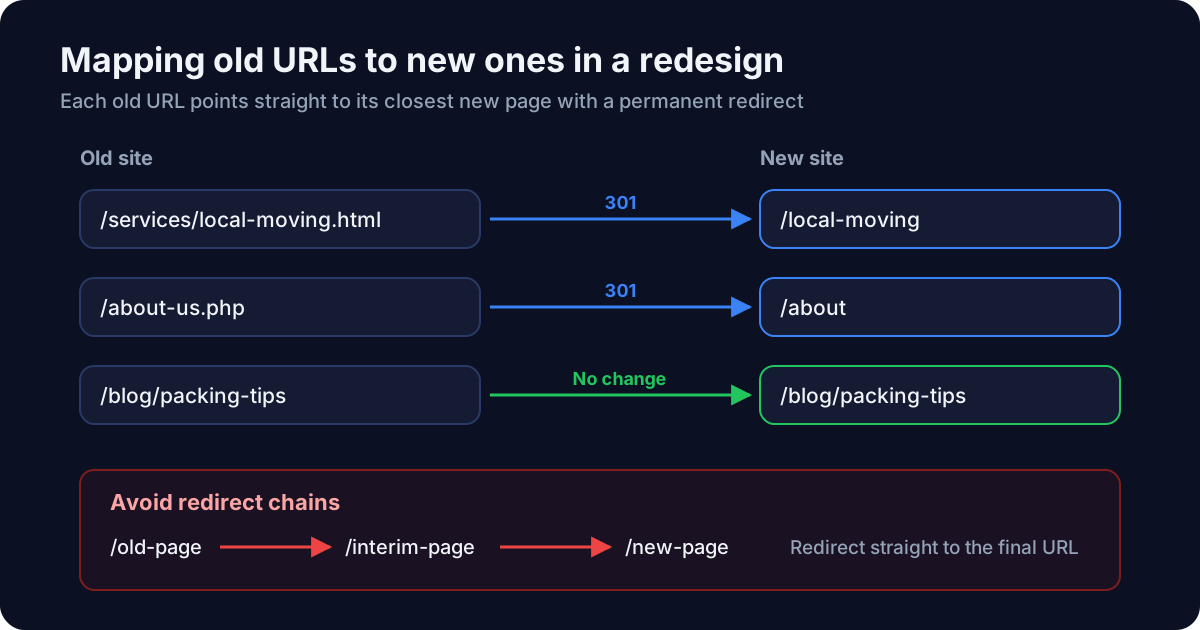
- Map each old URL to its new URL. Google says to "prepare a URL mapping from the current URLs to their corresponding new format." Map each page to its closest match, not everything to the homepage.
- Carry over the content that ranks. Check which pages bring search traffic and keep their substance, headings, and internal links.
- Carry over technical details: page titles, meta descriptions, canonical tags, and structured data. See what is schema markup.
- Test the new site before launch, including the redirects.
How should redirects be set up?
Google's guidance is specific:
- Use permanent server-side redirects. Google recommends "server side permanent redirects from the old URLs to the new URLs" and HTTP permanent redirects "such as 301 and 308." Client-side redirects are a last resort.
- Don't worry about link value. Google says "301 and other permanent redirects don't cause a loss in PageRank."
- Avoid chains. Google advises "redirecting to the final destination directly." If a chain can't be avoided, keep it short, "ideally no more than 3 and fewer than 5."
- Keep them. "Keep the redirects for as long as possible, generally at least 1 year." For visitors, Google suggests considering keeping them indefinitely.
Test redirects as real requests, checking the status code and destination, not by looking at where the browser ends up.
What should you check on launch day?
Google lists these steps once redirects are live:
- Check canonical tags and robots rules. Make sure
rel="canonical"points to the new URLs and remove anynoindexadded during development. - Test the redirects with the URL Inspection tool for individual pages, or with scripts for many.
- Submit the new sitemap in Search Console.
Google also warns: "Don't forget to remove any noindex or robots.txt blocks that were only needed for the migration." If the redesign changes forms or phone links, test the quote form and tracking on launch day as well.
How do you monitor a redesign after launch?
Watch Search Console and analytics for several weeks:
- Indexing: pages from the new sitemap should become indexed as old URLs drop out.
- "Not found" errors: Google says a common mistake is "redirecting to the wrong (non-existent) URLs on the new site."
- Search traffic by page: compare top pages before and after, and investigate any page that loses most of its traffic.
- Conversions: quote requests and calls per visitor, to catch broken forms or tracking.
Google says that for a medium-sized site, "a few weeks" is typical for most pages to move in its index, and larger sites can take longer. Some movement during that period is normal.
Does a domain change need anything extra?
Yes. When moving to a new domain, Google's Change of Address tool in Search Console tells Google about the move, after redirects are in place. It isn't used for moves within the same domain or for switching from HTTP to HTTPS; for those, redirects and updated sitemaps are enough.