
What is offline conversion tracking?
Offline conversion tracking reports a sale that happened away from the website back to the ad platform that started it. Google describes offline conversion import as a way to "see what happens in the offline world after someone clicks your ads."
For a moving company, most sales are offline. A customer fills out a quote form or calls, talks to an estimator, maybe gets an in-home or video estimate, and books days later. Google Ads sees the click and, with conversion tracking, the form or call. It doesn't see the booked move unless the business reports it.
Why does it matter for a moving company?
Google Ads optimizes toward the conversion actions you define. With Smart Bidding, Google says, "real-time auctions bid based on your conversion probability." If the only conversion it knows about is a form fill, a form fill is what it optimizes for, whether that form came from a serious customer or a price shopper. Reporting booked moves tells it which clicks produced paying customers.
It also fixes reporting. Cost per booked move is a better measure of ad performance than cost per lead, and it can only be calculated when booked moves are connected to the ads that produced them.
How does Google Ads match an offline sale to an ad click?
Google Ads supports two matching methods, and they can be used together:
- The Google Click ID (GCLID). "Google Ads provides you with unique IDs, called Google Click ID (GCLID), for every click that comes to your website from an ad." The business saves the GCLID with the lead. When the lead converts, it sends the GCLID back "along with a few details about the type of conversion it was and when it happened."
- Enhanced conversions for leads. The website sends Google hashed lead information, such as a hashed email address, when the lead is submitted. When the lead becomes a customer, the business imports the same hashed information, and Google uses it to attribute the sale to the ad.
Google recommends enhanced conversions for leads for new setups: "If you have not already adopted offline conversion import, we recommend starting with enhanced conversions for leads instead." It describes it as "an upgraded offline conversion import that is easier to set up."
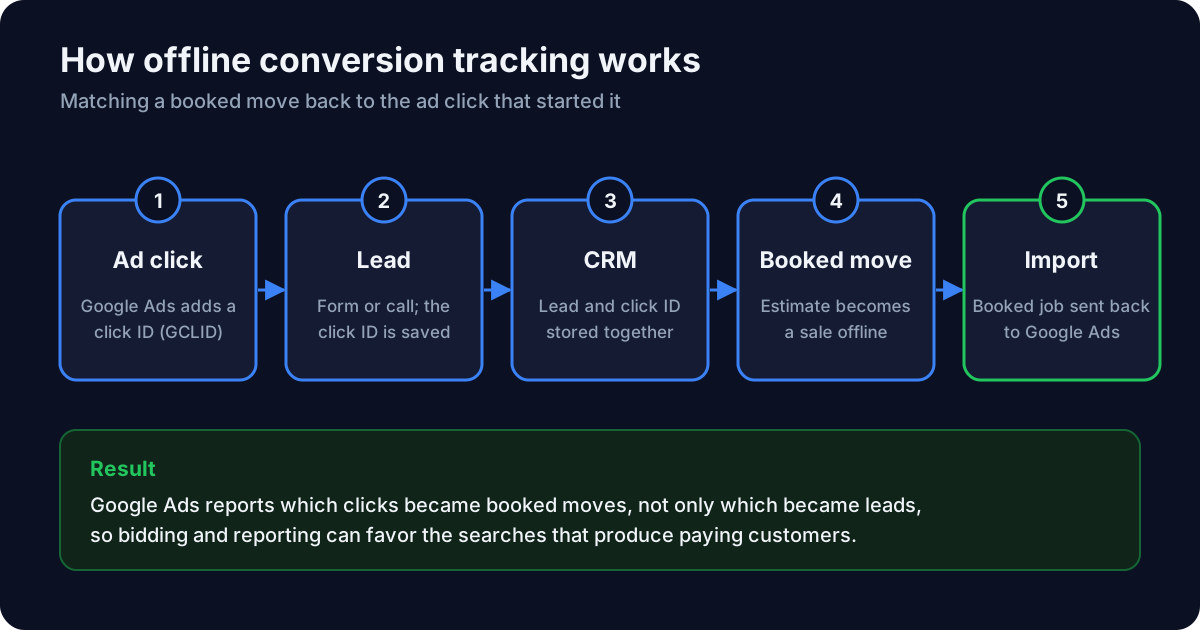
What does a moving company need in place?
Google's requirements for importing offline conversions with the GCLID include:
- Auto-tagging turned on in Google Ads, so each ad click carries a GCLID.
- Website changes to capture the GCLID from the landing page URL and pass it through every lead form.
- Storage for the GCLID with each lead in the CRM or lead tracking system. Google notes "the GCLID is case sensitive."
- A click-to-conversion cycle within the import window, which Google lists as 14 or 90 days depending on the data source.
For enhanced conversions for leads, the website's Google tag captures customer details from the lead form, such as an email address or phone number, and sends them hashed.
How are phone-call bookings reported?
Calls can be imported too. Google says call conversion import lets you "track when phone calls lead to sales or other valuable customer actions." It requires Google forwarding numbers, which Google Ads uses for calls from ads and for website calls when website call conversion tracking is set up. See what is call tracking.
How often should booked jobs be imported?
On a regular schedule that keeps imports inside Google's window, such as daily or weekly, using the same conversion action every time. Google's Data Manager can import the files. Importing a value with each booking also lets campaigns bid toward conversion value; Google lets advertisers "assign an optional ROAS or CPA target" to their conversion goals.